Every day, some news about a major website being hacked or a sensitive data being stolen is reported on the Internet and suddenly almost every Webmaster freaks out.
In the excitement and turmoil that accompanies launching a website, it is quite easy and obvious to overlook little details, especially by new bloggers. However, website security isn’t a little detail that can be missed. Still it is overlooked by a majority of webmasters, who unintentionally use weak passwords, keep the default database settings, and never update their sites.
If you are already running or planning to launch a WordPress powered website, make it your primary concern to keep your website secure from hacking and spamming.
In the majority of cases, WordPress websites are hacked because of their outdated versions, or unnecessary themes and plugins installed since outdated files are often traceable and thus, become give an open invitation to hackers.
Why Take Hardening WordPress Security So Seriously?
When you take different issues into account it seems pretty obvious why hackers consider CMS to be the top targets. Some assume that since Drupal, Joomla and WordPress are big names, they ought to provide a certain form of security. However, this is not true. The fact is, these platforms are most vulnerable to hacking by nature as they are developed using open source frameworks.
WordPress, as a matter of fact, is one of the most preferred platforms for creating sites today. It powers more than 25% of the market share and has been used by small to large enterprises. Since it is gaining in popularity with the passage of every day, WordPress is a common hacking target for hackers.
A well-established website usually receives between 20,000 and 1,50,000 unauthorized login attempts on a daily basis. The vast majority of these hacks are originated from unknown sources or hackers employing brute force techniques to get an access to your and use it for their own benefit.
Though these open source frameworks offer many benefits, they also share some flaws. With no one to take responsibility for potential issues and with no price tag, it’s common to see final products with some security issues. Moreover, since these platforms are so popular, security concerns are generally desired by either member of hacker’s community or security researchers.
Once discovered, these issues turn into a virtual gold mine for hackers, offering the easiest way for them to perform mass-scale attacks.
7 Essential WordPress Security Tools and Plugins
In this section, we are going to share some useful WordPress plugins to help you harden your website’s security.
1. WP Security Scan:
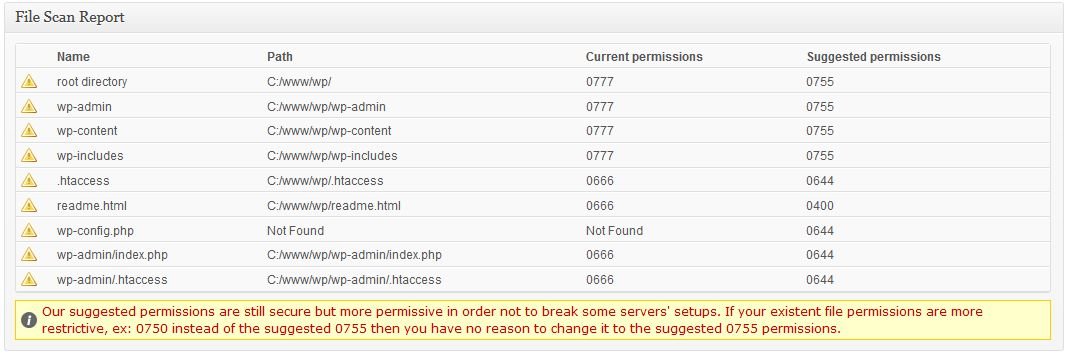
WP Security Scan plugin allows you to scan your WordPress powered website for malware or other security threats. The plugin not only finds the vulnerabilities in your website but also offers effective tips to get rid of these issues.
2. Ask Apache Password Protect:
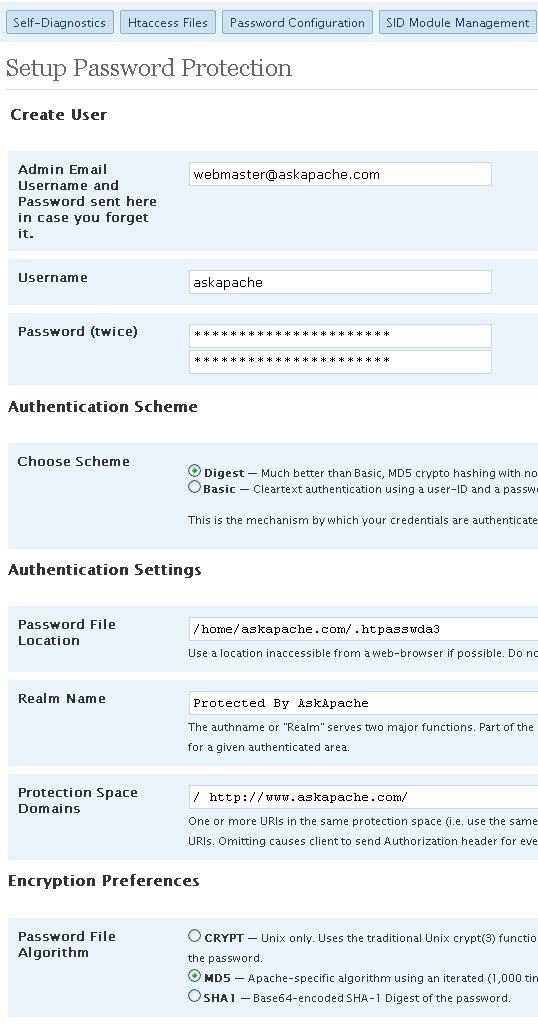
Ask Apache Password Protech is yet another popular WordPress plugin that does not control the CMS or mess with your database, instead, it operates at the application level by using or controlling PHP to combat security attacks. It simply adds multiple layers of security to your website.
3. Login Lockdown:
Login Lockdown is one of the most popular and amazing WordPress plugins that helps you to lock the number of attempts for some time on your admin panel after a particular number of login attempts.
5. WP-DB Manager:

WP-DB Manager, as the name suggests, manages your database and is a great alternative to the WordPress Backup Manager. It enables you to run selected queries, drop/empty tables, delete backup database, restore database, backup database, repair database and optimize the database.
6. CodeGuard

CodeGuard is one of the most popular backup services that offer automated backups. CodeGuard allows you to connect your site with this backup service provider through SFTP/FTP/MySQL information and automatically takes an initial backup. The service further allows you to monitor your site daily for any changes and scans it for malware and security threats. CodeGuard offers many plans starting at $5 per month.

Sucuri is a leading security and malware scanning service that has been around for many years. The service also comes with a free WordPress plugin to help emerging business to protect their sites against hacking.
Sucuri Malware Scanning service scans your site for common issues such as spam injections, defacements, and malware for absolutely free. It also checks whether your site’s server has been blacklisted.
5 Tips To Hardening WordPress Security Best Practices
1. Adjust settings on your FTP directories
Compromised passwords and insecure shared hosting environments may make it easy for a hacker to gain access to your website’s FTP, where harmful files can be uploaded to your WordPress directories.
However, adjusting the settings of your FTP, you can reduce the risk of a website hack. Changing the settings and give only your FTP account write access to certain folders including wp-content, wp-includes, wp-admin, and the root directory.
2. Use Two-Factor Authentication

The two-factor authentication also known as 2-step verification and 2FA add two layers of authentication where a user not only uses his/her username and password to login but also unique code generated for one-time use. This unique code is usually received on a device via iOS/Android app, or SMS.
3. Protect Your Files Using .htaccess
.htaccess file plays a vital role in your WordPress website. If you have been using WordPress for quite some time, you’d know about .htaccess file. Making changes in this file can have a huge impact on your website’s security.
4. Wondering How?
Well, .htaccess file directly influences the permalinks of your site and how it deals with security. You can insert a variety of code snippets into this file to set what files are visible inside your website’s directory.
If you were new to WordPress, you would want to hide wp-config.php file since it is the most important file in your directory, which contains sensitive data including your personal info and database information.
5. Add the following code to hide wp-config.php file:
<files wp-config.php>
order allow,deny
deny from all
</files>
WordPress security has so much more than merely following password best practices and installing a security plugin. The essential tips and tools mentioned are not the only security safeguards you need to pay attention to, but they are certainly a good start for those who are just starting out with WordPress and may have trouble executing the basics.
About the Author:
Jason is a WordPress expert, associated with Wordsuccor Ltd. and has a lot of experience in WordPress plugin development. He has delivered numerous range of quality products related to this. He has a strong passion for writing useful and insights about WordPress tips and tricks.