The Hook: Democratizing Online Education
If you have ever tried to build an online course with WordPress, you know the pain. Most LMS (Learning Management System) plugins feel like clunky, backend-heavy administrative panels from the early 2000s. You want to teach, but you end up fighting with shortcodes and settings pages.
Enter Tutor LMS.
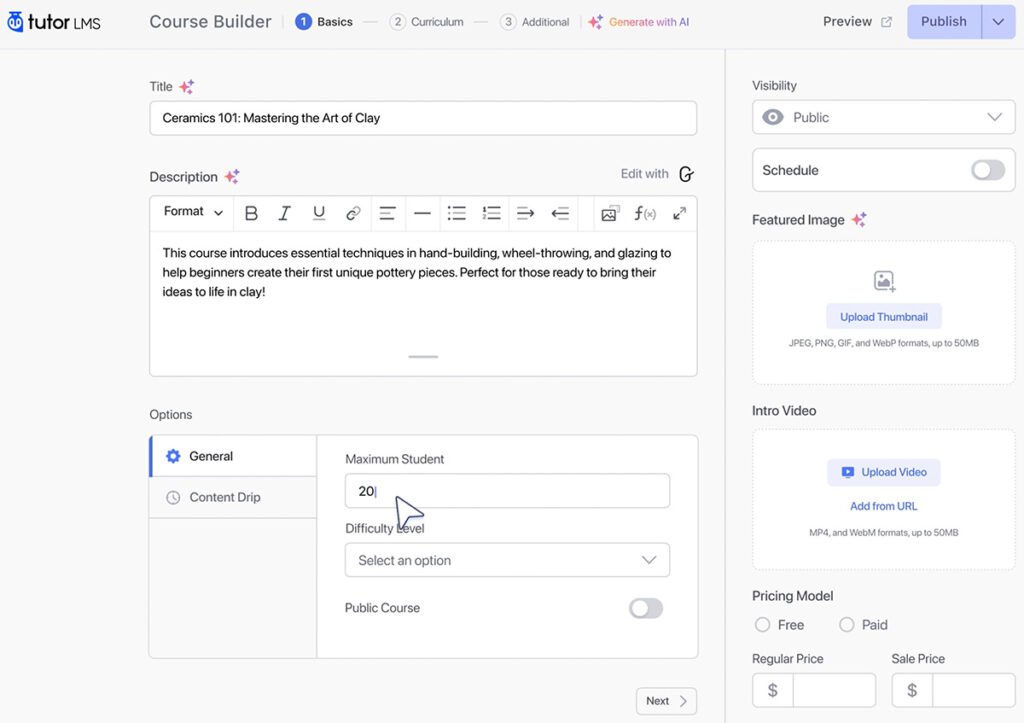
Themeum, the team behind it, didn’t just build another LMS; they built a UI-first experience. The core promise of Tutor LMS is simple: let you build, manage, and sell courses entirely from the frontend, without ever seeing the scary WordPress dashboard.
As a developer who has built platforms on LearnDash (the powerhouse) and LifterLMS (the marketer’s choice), I was skeptical. Could Tutor LMS actually balance power with simplicity? I spent the last week migrating a test course into Tutor LMS to find out. Here is my unfiltered analysis.
Quick Link: Want to see the frontend builder in action? View the Live Tutor LMS Demo Here to try it before reading further.
Key Features: The “UI-First” Difference
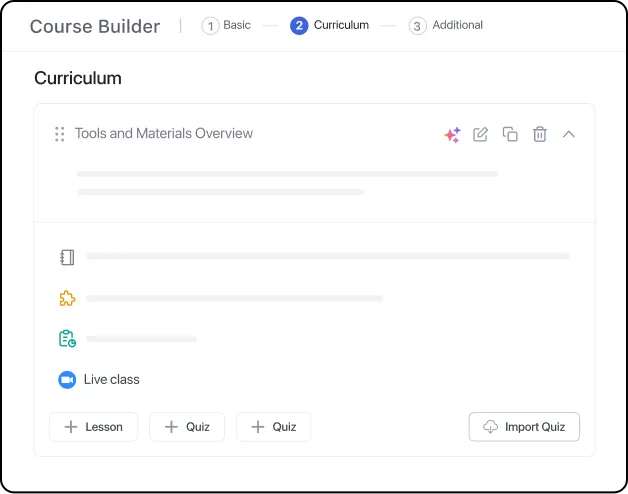
The Frontend Course Builder (The Star of the Show)
This is the feature that matters most. In competitors like LearnDash, you often have to bounce between a “Course” page, a “Lesson” page, and a “Topic” page in the backend to stitch a course together.
With Tutor LMS, the experience is seamless.
- Visual Architecture: You see your entire course curriculum on one screen. You click “Add Topic,” then “Add Lesson,” and it appears instantly in the list.
- Drag-and-Drop: Reordering a module is as simple as clicking and dragging. It feels like using a modern SaaS app (like Teachable or Thinkific) rather than a WordPress plugin.
- Why this matters: It lowers the barrier to entry. You can hand this tool to a non-technical instructor, and they can build a course without breaking your site.
Advanced Quiz Builder
Most LMS plugins give you basic Multiple Choice questions. Tutor LMS Pro goes significantly deeper with 10+ question types, including:
- Image Matching: Great for visual learners or younger students.
- Ordering: Force students to arrange items in the correct sequence.
- Short Answer: Requires manual grading, which creates a higher-touch, premium course feel.
Multi-Instructor Marketplace
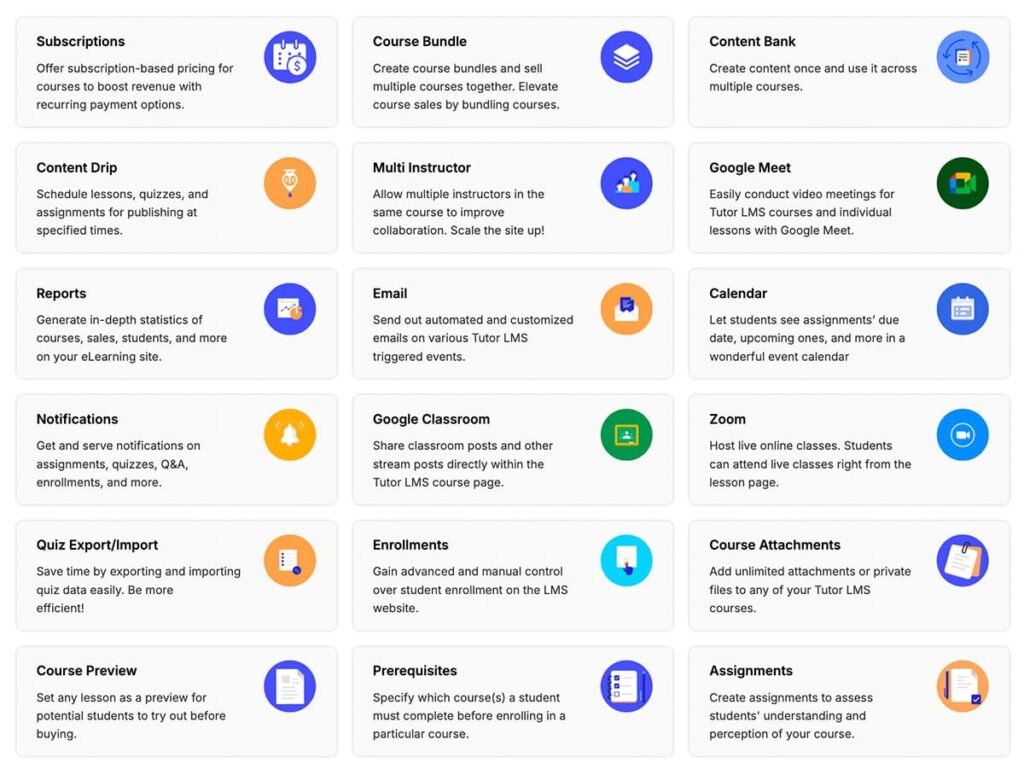
This is where Tutor LMS punches above its weight. It includes native multi-instructor capabilities out of the box (unlike others that require expensive add-ons). You can essentially build your own Udemy or Coursera clone. Instructors get their own frontend dashboard to track earnings and withdraw funds, meaning you (the admin) never have to give them backend WordPress access.
User Experience & Setup
Installation: The setup wizard is excellent. Upon activation, it asks you: Are you a single instructor or a marketplace? It then auto-generates the necessary pages (Student Dashboard, Instructor Registration, Course Archive). This saves about 30 minutes of manual configuration compared to older plugins.
The “Aha!” Moment: The Spotlight Mode. When a student enters a lesson, Tutor LMS hides the header, footer, and sidebar of your theme. The interface becomes completely focused on the video and content. This “distraction-free learning” is usually a feature you have to code yourself or buy a special theme for. With Tutor LMS, it’s a checkbox.
Pros & Cons: The Honest Truth
| Pros (Why you’ll love it) | Cons (The trade-offs) |
| Design-Centric: The default UI looks professional immediately. You don’t need a designer to make it look “not broken.” | Support Consistency: While improving, their support response times can sometimes lag behind the “premium” standard set by LearnDash. |
| Generous Free Version: The free version allows unlimited courses and lessons. You can actually launch a viable course for $0. | Add-On Bloat: To get full functionality (Certificates, Drip Content, Integrations), you need the Pro version. The free version is strictly for simple courses. |
| Frontend Focus: Keeps instructors out of your WordPress backend, increasing security and simplicity. | Mobile App Cost: While they offer a mobile app solution, it is often an additional high-ticket cost or requires a complex white-label setup. |
| Theme Compatibility: Works surprisingly well with Elementor and Divi, offering dedicated widgets for both. | Migration: Moving away from Tutor LMS later can be tricky due to how they structure data, though this is true for most LMS plugins. |
Tutor LMS vs. LearnDash: The 2026 Showdown
While both are top-tier WordPress plugins, they serve different types of creators. Here is how they stack up in the current market:
| Feature | Tutor LMS (The Modern Choice) | LearnDash (The Industry Standard) |
| Best For | Solo Educators & Marketplaces | Large Organizations & Universities |
| Course Building | Native Frontend Builder (No backend needed) | Backend-focused (Frontend requires add-ons) |
| Quiz Engine | 10+ Question Types (Very visual) | 8 Question Types (Advanced logic/banks) |
| Monetization | Native e-commerce + WooCommerce | Built-in Stripe/PayPal + WooCommerce |
| Multi-Instructor | Built-in (Udemy-style dashboard) | Requires premium 3rd party add-ons |
| Gamification | Basic (Badges & Certificates) | Advanced (Leaderboards & Points) |
| SCORM/xAPI | No | Yes (Professional standard) |
| AI Features | AI Course & Quiz Assistant (Native) | AI Outline Builder (Premium add-on) |
| Lifetime Deal | Available (Pay once, own forever) | Annual Subscription Only |
| Free Version | Robust Free Version available | No Free Version (Demo only) |
Pricing & Value
Tutor LMS uses a tier-based annual model:
-
Basic (Free): Good for testing, but lacks certificates and payments.
-
Individual Plan (~$199/year): 1 Site. Includes all Pro add-ons (Certificates, Drip, Reports).
-
Business/Agency: Higher limits for more sites.
Is it worth it? If you compare it to a SaaS like Teachable ($1,400+/year for similar features), Tutor LMS is a steal. Compared to LearnDash ($199/year), the price is identical. The value here isn’t in saving money; it’s in saving time on design and instructor management.
Pricing Check: Discounts happen frequently. Check Current Tutor LMS Pricing Here to see if there is an active sale.
The Verdict: Who is Tutor LMS For?
Buy Tutor LMS if:
-
You are a beginner or non-coder who wants a beautiful course site up today.
-
You are building a Marketplace with multiple instructors.
-
You care deeply about the design and UI of the learning experience for your students.
Skip Tutor LMS if:
-
You are a university or large institution requiring complex SCORM compliance or deep academic grading systems (Stick to LearnDash or Moodle).
-
You are on a strictly $0 budget and need payment gateways (You will need the Pro version for robust e-commerce).
Final Thought: Tutor LMS has successfully challenged the status quo. It is the most “modern” feeling LMS on WordPress right now. If LearnDash is the “Windows” of LMS (powerful, ubiquitous, a bit clunky), Tutor LMS is the “Mac” (polished, intuitive, and beautiful).
Get Started with Tutor LMS Today
(Risk-Free with their 30-Day Money-Back Guarantee)